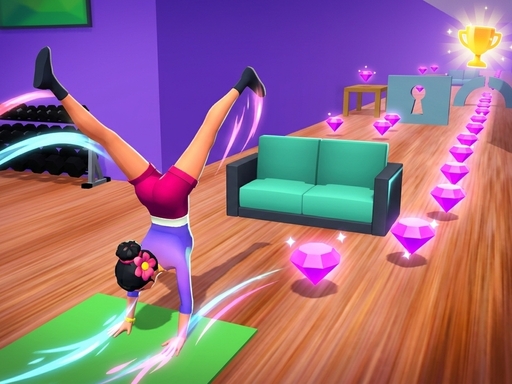
About Strike a Pose
The gap ahead in Strike a Pose has a shape. You may need to fit through a narrow opening on one side or keep out of the way of a piece of furniture that takes up the other. The character bends and stretches as you adjust the pose along the track. Finding the right alignment gives you a way past the obstacle. Finding it early gives you time to decide whether the gems off to the side are worth reaching for.
Recognize the opening before shaping the character
Start by looking through the obstacle. Notice which part you can see on the other side and where the opening sits relative to the center of the track. If there is furniture near the path, let its outline guide where you can move. On the next obstacle, compare the shape of the gap with the part of the character you expect to move into it. A small adjustment while you have room can show whether you are going in the right direction before the opening gets close.
For example, suppose you can see a narrow opening just to the right and a gem farther out. Try setting up the pose for the gap while the gem is still in view. Decide whether you could reach it and return to an aligned position before passing through. If the pickup would leave you needing to switch late, take the direct opening. You will get another opportunity to collect a gem in a section where the next obstacle gives you more time.
Think about the next shape as you come out of this one
Some stretches reward a pose that looks extreme. Test what those moves do to the rest of the character while the track still has room. Look past the nearest obstacle and find the next bit of furniture or opening as soon as you can. If you are holding a strong bend that worked for the last obstacle, give yourself time to move away from it before you need an opposite one. The point where you straighten or switch is often where a successful sequence starts.
A replay can help with the timing. Pick a pair of obstacles that caught you. Notice whether you completed the first pose and held it too long or whether the second move began in the wrong direction. On the next run, keep the first part the same and let go of the pose a little earlier. Then see how much time you have for the following movement. If that improves the passage, try taking the gem you skipped before and see whether you still have enough time to get in position.
From a piece of furniture to a narrow opening
Use a section with furniture taking up one side of the track and a narrow gap visible farther ahead. Before the first obstacle, put the character’s widest part into the open side. Hold and drag only as far as you need to clear the furniture. As soon as the object has passed, look at the next opening. For a gap that is taller and narrower than your current pose, start bringing the extended parts closer in the direction the game allows while the opening is still ahead. Let the figure pass the narrow point before stretching out again. The two shapes have different jobs, even when the same drag makes both of them.
After clearing the gap, look at the character’s outline and the location of the next gem. If reaching it would force a big stretch immediately before another tight opening, leave it and finish the passage. On a retry, change the motion while the first piece of furniture is still visible. Then see whether the figure arrives at the gap with less work left to do. That comparison is about where the arms and body are positioned when the opening reaches you, not simply how quickly you move the pointer.
Use one drag you can see
With a mouse, hold the click and drag left or right. On a phone, swipe in the direction you want to adjust. Start the input where you can keep the gap in view. If a smaller drag has already put the character where you need it, let the movement show before adding another one. That keeps your attention on the passage you are trying to fit through.
Developer AlexGames.











