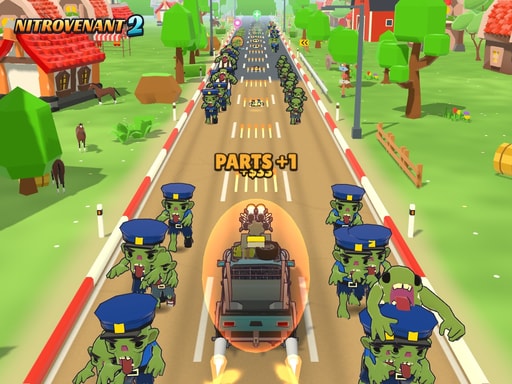
About Nitrovenant 2
One ramp in three parts
Nitrovenant 2 puts an armored vehicle on a road filled with obstacles, zombies and ramps. Its roof weapon can fire automatically while you are lining the vehicle up. That leaves you with a useful job before an early ramp: glance at the lane that carries on beyond it. Knowing where you want the vehicle when it comes down changes how you use the jump.
- Approach. Get into line with the ramp and identify the next stretch of road. A lane that is clear on the approach can take you toward a pothole after landing.
- Air. Space or W gives you a jump. When the car is airborne, use a direction for a trick if you have room to finish it. Watch for the moment the vehicle comes off the lip, so you can tell a natural crest from a jump you triggered.
- Landing. Look back to the road while the trick is finishing. If you need the next lane, straighten the car before you spend another input on a trick or use the nitro.
An early ramp is worth trying twice. Use one pass to learn the takeoff and see where the vehicle lands. On the next pass, add a trick and see whether you can still reach the clear lane on time. That comparison is more informative than pressing several actions during the first jump.
Decide whether the next space is for a combo or a correction
Combos open Fury mode. The route gives you chances to carry a chain through a series of obstacles or tricks. Look at where you will be between those moves. If you are headed for a ramp whose far side is hard to see, keep a simple jump in mind. If you can already see which lane you want after landing, you can make an air trick a useful part of the sequence. A clean part of the road can extend the run long enough to give you a better chance for another combo later.
Hold R for nitro and watch what your extra speed will take you toward. Try it on a visible straight before using it on the approach to a tight place. A speed change can give you a way to continue through a crowd, and it shortens the interval before the next obstacle. Think about how you will use the first lane change or jump afterward. Spend the boost when you can see a direction that still makes sense once the car is moving faster.
Power-ups and survivors can draw you toward another lane. Give the route to a pickup a look before using an extra move for it. If an obstacle is immediately beyond it, see whether you can land or change direction in time. You can try a recovery route on a stage you already understand. Notice what you were able to add to the run without taking away the direction you wanted for the next part of the road.
Save room to act when the boss is dizzy
A stage boss gives you a short opportunity when it becomes dizzy. Use the preceding part of the encounter to get somewhere you can both see the boss and act as soon as it shows that opening. If you need to correct your line first, do it while the boss is still active. The chance to attack is easier to use when you can focus on the boss as it appears.
Tricks build a combo, and the combo can unlock Fury. Practise carrying a combo out of a stretch of road you already understand before trying to do the same during a boss encounter. If you lose the combo as soon as you need to move away, a smaller set of tricks on a clear approach can give you more time to prepare for the next dizzy window.
Put the garage to work on a road you can recognize
Spend progress on weapon, armor and tires. If the busy part of the run ends because the car is already struggling before you can move away, see what the available armor change actually helps in the game. If the road is readable and you usually take the same direction but cannot manage a particular part of the crowd, try comparing a weapon upgrade. If you have trouble around a turn or landing, look at the tires and choose a road you can take again as a test. Holding one route the same gives you a way to see where the difference begins.
The game has twelve collectible cars, paint choices and parts. A new car deserves a recognizable place to see how it handles. Test an early pothole, one ramp and a straight you can use for boost. If the car gives you a better result at one of those places, keep it in mind when the next area changes the scenery. The areas include sunny fields, rainy forests, desert, a frozen pass, a dead city and the Inferno. Each one gives you another stretch in which to read the same controls.
Use Endless to see which part of the run you can keep repeating
Daily challenges and missions give you short objectives. Try one when you want to revisit a particular action. Endless gives you a reason to see how long you can keep following a line after the ordinary stage target changes. Decide whether the attempt is for distance, a combo or learning a movement. You can then see whether losing the run was about a single obstacle or what you did repeatedly before it.
On keyboard, hold J or the mouse button for the separate machine-gun action when needed, use a direction in the air for tricks and pause with P/Esc. Mobile uses side swipes for lanes, an up swipe to jump and air swipes for tricks. Try the same ramp with and without an air input before carrying a bigger combo into another part of the route.
Game credit on GameMonetize · Lipy Servico Digitais LTDA











