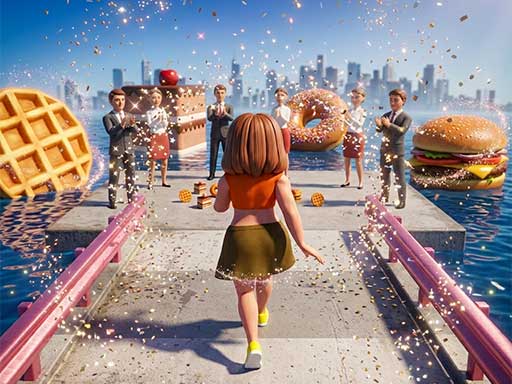
About Body Evolution Game
What to watch when you collect the first food item
In Body Evolution Game, start by distinguishing the food on the runner’s path from the large food illustrations around it. The narrow course on the cover is framed by a waffle and a burger. Check whether the item you are steering toward is actually in a reachable part of the playfield. On an opening attempt, choose one accessible pickup while keeping the next obstacle in view. Look at the display and the runner just before and immediately after collecting it. If the game shows a change to the score or avatar, use that change as your reference for what the item did. A food illustration beside the track is not by itself a pickup.
Read the result of a pickup before moving toward a second one. Watch the runner and any displayed counter during the first collection. When you reach the finish, compare the outcome with the last pickup you saw. A turn toward an item costs part of your approach to the next obstacle, so it helps to learn what one item does before deciding to leave the main line for a group. Follow the stage prompt when it shows a specific target or result.
Give the obstacle a shape before reaching for its nearby pickup
Suppose a section has a clear route along one side and a group of food nearer a barrier. Look at how long the clear route stays open. If you can take one piece near the barrier and move back before reaching it, you have a collection route to compare with the simpler one. If the next obstacle is visible in the direction you would use to return, take another line. Seeing the space after the food gives you useful information about how much risk the pickup actually asks for in the game.
On a different stretch, several pieces may line up with a route you can already hold. Keep the direction steady long enough to take the ones that fit. As soon as the food turns toward another part of the path, check what appears there. A piece that seems to extend the streak might also put you near the part you needed to avoid. Choosing a smaller group is useful when it keeps you moving toward the finish and gives you another chance to collect.
Compare the pickup and the obstacle separately
Take one short route straight toward the visible finish, then try another attempt in which you add a single side pickup. Check how the display changes at the item and at the end of the run. If choosing the pickup sends you into an obstacle before you can check the result, return to the direct route and make an earlier, smaller adjustment on the next attempt. Play on a touchscreen or with the mouse as the game’s initial prompt indicates. Watch which movement the game actually responds to before choosing how much sideways room the runner needs.
Follow the course you have rather than a score you expect
The runner gives you objects to collect on the way to a finish. When there are a few decisions left, check the next visible opening before reaching away for another pickup. An ordinary finish can show you more about the last part of a route than an attempt that ends while chasing something you usually leave behind. If you want a higher score afterward, put attention on the last cluster you skipped and see whether you can find an earlier way to approach it.
Use the mouse or touch to interact with the game. On a phone, keep the section ahead visible after each input so you can see what direction the run actually needs. A simple start is to collect from the clear route and compare one detour when you have enough space to return. That gives you a result you can recognize as the course and its obstacles get harder.
Game credit on GameMonetize · SKY HIGH STUDIO











