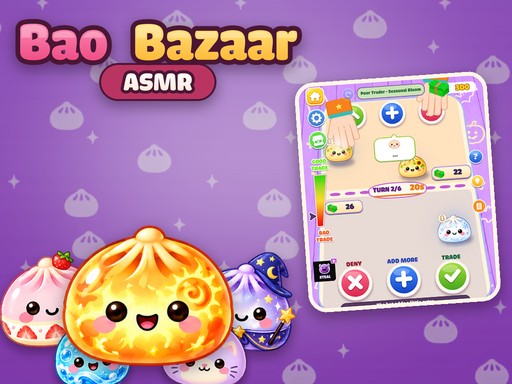
About Bao Bazaar ASMR
Open a steamer before opening the market
Bao Bazaar ASMR begins with a pack on a shelf. Tear it open, lift the lid of the bamboo steamer and see which bun was inside. Some are animals or desserts. Others look like characters, including the Wizard and the bright Sun bun. The rarity labels are R, SR, SSR and UR. You can spend a session opening packs and looking at the new designs or use the collection to give your next trade a particular purpose.
To look at a bun up close, select it and press or drag over it. Watch how it changes shape with a longer press, then try moving your finger across it. The soft sounds are part of that close-up. You can give that small interaction as much attention as you want before moving on. It is also a way to see design details you may have missed when the bun was one of several items on the shelf.
See the rooms before you put together a trade
There are more than 100 buns, and the themed rooms make them easier to think about in groups. Before you visit a trader, see which room you are trying to complete. If a bun is the only one you have of a type a room needs, losing it has a different cost from giving away a duplicate. A rarity badge is useful information, and the place a bun has in your own rooms is useful too. Look at both when deciding which items to put forward.
Suppose you open two copies of a bun and still need another design for a room. Write down the one you would like to find, even if it is just a mental note. When an offer appears, check whether it gives you the missing design or simply adds a different spare. A trade can be fair by the meter and still carry you away from the collection goal you had before you sat down. If your goal is variety, an offer of a different bun could be what you want. The choice depends on the room you came to work on.
Face a bot trader with a plan for the timer
Trades work one on one and in turns. You can offer buns or virtual cash, ask for more and accept or decline within the time available. The trade meter gives some feedback about the deal. Read each side and look at what has actually changed after a request. If you asked for another bun, confirm the offer still includes the part you originally wanted before accepting the new version.
Choose in advance how much you are comfortable giving for the design you came for. It keeps the countdown from making the decision for you. If the offer improves in terms of value but asks you to spend a bun you have been looking for, take a moment to decide which goal matters on this visit. You can decline and try another negotiation. If you are only testing the screen, do it with a spare that you are comfortable putting into a trade.
A pack opening and a trade have different results
| Activity | What you do | What changes |
|---|---|---|
| Open a pack | Pick it from the shelf, swipe to tear it and lift the steamer lid. | A new bao is revealed. The game shows its rarity, and the opening contributes to your level. |
| Negotiate with a bot | Put a bun or game currency into the offer and compare the other side. | Nothing trades until you accept a deal. Watch the meter and timer while deciding. |
| Use the Market | Check a bao's chart and the current offer. | Buying or selling changes your holdings and virtual coin balance. |
Suppose a bot offers you a bao missing from a themed room and asks for one you already own. Look at whether your bun is a duplicate and where the Good Trade or Bad Trade meter sits before changing the offer. Add coins or ask for more only when the revised deal addresses the reason you wanted it. If the timer is nearly over and the exchange would break a collection you want to keep, decline and look at another trader. If you accept, verify that the needed bao is in your collection. The meter gives you feedback on the offer, but the room shows you why the trade mattered.
The currencies and trades here are virtual. A rarity label tells you about the in-game collection, and the chart is for game prices. Opening another steamer can be a better next step when you mainly want a new collectible. Trading is more useful when you know which bao you are trying to acquire and what you are willing to offer.
What the chart adds to the bazaar
Market mode uses prices that change over the in-game day. Look at the line for a bun before you buy or sell it. See where its current price sits relative to the visible movement. That gives you a better reason to make a decision than the price on its own. The same number could be low for one bun and high for another.
Try following a single design on the chart over more than one occasion. You can compare a place you thought was a good time to buy with what happened later in its in-game cycle. If you also need that bun for a room, decide whether you are shopping for a missing piece or speculating with a spare. The two reasons can lead to different decisions even when you are looking at the same chart.
The coins, cash and deals are all virtual. The market is one activity inside a collecting game. A session can just as easily be about opening a pack, checking a themed room, upgrading a bun or completing a quest. Progress saves automatically, so you can leave after you finish the piece of the collection you were working on.
The controls stay close to the object
Click or tap a pack and swipe across it to tear it open. Click or tap the steamer lid to lift it. Select a bun for the close-up and press and drag to squish. Trade and Market use their own buttons for offers, buying and selling. In the collection, return to the room you chose at the start and see which spot the latest find fills.
Game credit on GameMonetize · Duckie











